Twist Card Testbench: Opposing Test Procedure & Validation

Hi OwnTech Community,

I am launching an academic project to design a simple, reliable test bench for Twist Card calibration and validation.

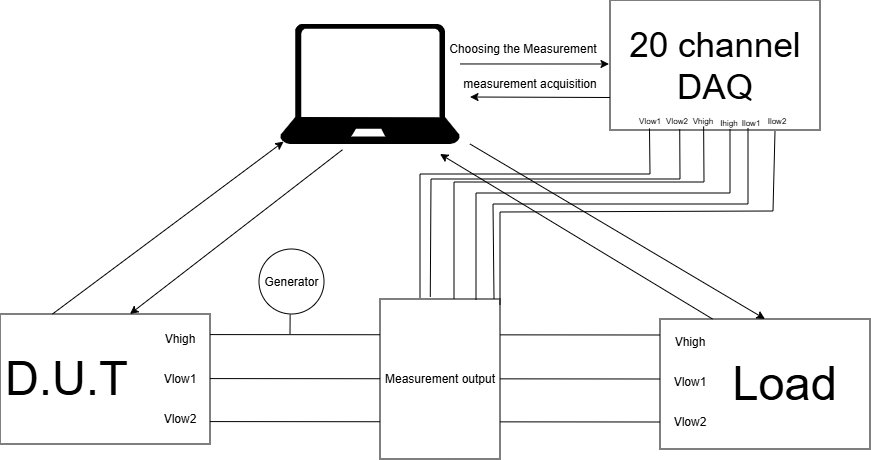
Using a 20-channel DAQ, two coils, and a dual-card opposing test setup, my objective is to establish a clear testing procedure and build a functional validation rig.

For now, i only started to learn about how to use the twist board. I am currently testing it in Buck mode.

Thank you for reading.

Here is an idea of the final complete system :

The first Tawist board is the primary test subject and the second board acts as the active load. We are tiesting this example “https://github.com/owntech-foundation/examples/tree/main/TWIST/Communication/python_comm_library“ to manage board interaction.

So our next step is to learn how to use the python example and try it on only one board.

In parallel, we are working on the DAQ to ensure the measurement acquisition.

Hello,

Here’s the library to talk with the DAQ in python.


"""Agilent 34970A helper for temperature measurements.

This module provides a lightweight wrapper around the 34970A mainframe so the
factory scripts can query temperature channels without changing the legacy
Keithley integration.

Typical usage::

    import pyvisa
    from Libraries.Agilent34970A import Agilent34970A

    rm = pyvisa.ResourceManager()
    resource = rm.open_resource("GPIB0::10::INSTR")
    dmm = Agilent34970A(resource, channels={"T1": "101", "T2": "103"}, tc_type="K")
    print(dmm.read_temperature_celsius("T1"))
    print(dmm.read_temperature_celsius("T2"))
    for label, value in dmm.read_all_temperatures_celsius().items():
        print(label, value)
    dmm.close()
"""

from __future__ import annotations

from typing import Dict, Mapping, Optional, Tuple


class Agilent34970A:
    """Minimal SCPI helper for the Agilent 34970A data acquisition unit.

    The goal is to offer just enough configuration to perform temperature
    measurements on a single channel while keeping the legacy Keithley code
    untouched.
    """

    def __init__(
        self,
        resource,
        *,
        channel: Optional[str] = None,
        channels: Optional[Mapping[str, str]] = None,
        sensor: str = "TC",
        tc_type: str = "K",
        reference: str = "INT",
        nplc: Optional[float] = None,
        sample_count: int = 1,
        autozero: bool = True,
    ) -> None:
        self._resource = resource
        self._sensor = sensor.upper()
        self._tc_type = tc_type.upper()
        self._reference = reference.upper()
        self._nplc = nplc
        self._sample_count = max(1, int(sample_count))
        self._autozero = autozero

        provided_channels: Dict[str, str] = {}

        if channels is not None:
            if channel is not None:
                raise ValueError("Specify either 'channel' or 'channels', not both.")
            if not isinstance(channels, Mapping) or not channels:
                raise ValueError("'channels' must be a non-empty mapping of labels to channel numbers.")
            for label, raw_channel in channels.items():
                str_label = str(label) if label is not None else str(raw_channel)
                provided_channels[str_label] = str(raw_channel)
        elif channel is not None:
            provided_channels[str(channel)] = str(channel)
        else:
            raise ValueError("At least one channel must be provided.")

        self._label_to_channel: Dict[str, str] = {}
        self._preferred_labels: Dict[str, str] = {}

        for label, chan in provided_channels.items():
            # Preserve the user supplied label for read_all_temperatures_celsius.
            self._preferred_labels[label] = chan
            # Allow addressing by either the label or the raw SCPI channel value.
            self._label_to_channel[label] = chan
            self._label_to_channel[chan] = chan

        self._default_label: str = next(iter(self._preferred_labels))
        self._configured_channels: Tuple[str, ...] = tuple(self._preferred_labels.values())

        self._configure()

    def _configure(self) -> None:
        # Clear previous state to avoid inheriting stale configuration.
        self._resource.write("*RST")
        self._resource.write("*CLS")

        # Temperature input configuration.
        if self._sensor == "TC":
            channel_list = ",".join(self._configured_channels)
            self._resource.write(
                f"CONF:TEMP TC,{self._tc_type},(@{channel_list})"
            )
            if self._reference == "INT":
                self._resource.write("TEMP:TRAN:TC:RJUN:TYPE INT")
            else:
                self._resource.write("TEMP:TRAN:TC:RJUN:TYPE EXT")
        else:
            channel_list = ",".join(self._configured_channels)
            self._resource.write(
                f"CONF:TEMP {self._sensor},(@{channel_list})"
            )

        if self._nplc is not None:
            try:
                self._resource.write(f"TEMP:NPLC {float(self._nplc)}")
            except ValueError:
                pass

        self._resource.write("UNIT:TEMP C")
        self._resource.write(f"SAMP:COUN {self._sample_count}")
        self._resource.write(f"SYST:AZER:STAT {'ON' if self._autozero else 'OFF'}")

    def read_temperature_celsius(self, label: Optional[str] = None) -> float:
        """Return the temperature of the selected channel in °C.

        Args:
            label: Optional label identifying the channel. When ``None`` the
                first configured channel is used. Labels can be the friendly
                names provided at construction time (``"T1"``) or the raw SCPI
                channel identifier (``"101"``).
        """

        key = self._default_label if label is None else str(label)
        try:
            channel = self._label_to_channel[key]
        except KeyError as exc:
            available = ", ".join(self.list_channels())
            raise KeyError(
                f"Unknown Agilent 34970A channel label '{label}'. Available: {available}"
            ) from exc

        if self._sensor == "TC":
            command = f"MEAS:TEMP? TC,{self._tc_type},(@{channel})"
        else:
            command = f"MEAS:TEMP? {self._sensor},(@{channel})"
        response = self._resource.query(command)
        return float(response.strip())

    def read_all_temperatures_celsius(self) -> Dict[str, float]:
        """Return a mapping of ``label -> temperature`` for all channels."""

        return {
            label: self.read_temperature_celsius(label)
            for label in self._preferred_labels
        }

    def list_channels(self) -> Tuple[str, ...]:
        """Return the tuple of configured channel labels."""

        return tuple(self._preferred_labels.keys())

    def close(self) -> None:
        try:
            self._resource.close()
        except Exception:
            pass


__all__ = ["Agilent34970A"]

Here’s a code for talking via RS485

//declarations
uint8_t buffer_tx[MMC_FRAME_SIZE];
uint8_t buffer_rx[MMC_FRAME_SIZE];

typedef struct {
    uint8_t test_RS485;             /**< Variable for testing RS485 */
    uint8_t test_Sync;              /**< Variable for testing Sync */
    uint16_t test_CAN;             /**< Variable for testing the CAN Bus */
    bool test_bool_CAN;             /**< Boolean variable for testing the CAN Bus */
    uint16_t analog_value_measure;  /**< Analog measurement */
    uint8_t id_and_status;          /**< Status information */
} ConsigneStruct_t;

ConsigneStruct_t tx_consigne;
uint8_t* buffer_tx = (uint8_t*)&tx_consigne;


    communication.rs485.configure(buffer_tx, 
                                  buffer_rx, 
                                  sizeof(ConsigneStruct_t), 
                                  slave_reception_function, 
                                  SPEED_20M); // custom configuration for RS485

    communication.rs485.turnOnCommunication();

//fill up the data frame

void slave_reception_function(void)
{
    tx_consigne = rx_consigne;
    tx_consigne.test_bool_CAN  = can_test_ctrl_enable;
    tx_consigne.test_CAN = (uint16_t)can_test_reference_value;
    tx_consigne.test_RS485 = rx_consigne.test_RS485 + 25;
    tx_consigne.test_Sync = ctrl_slave_counter;
    tx_consigne.analog_value_measure = analog_value;

    communication.rs485.startTransmission();
}
//to send data out
            communication.rs485.startTransmission();


//receive data frame


Hello everyone,

Using the Python communication protocol example, we attempted to communicate with both boards at the same time, selecting the leg modes and choosing which ones to activate or deactivate. This will be very useful for creating code that automatically checks the different measurements.

Today, we encountered some issues while trying to communicate with the DAQ in the 34970A Agilent data acquisition unit using a simple Python program with PyVISA.

It seems there may be a problem with my installation of NI-VISA and/or Keysight IO Libraries, specifically with the visa64.dll file required to communicate with the device. I tried changing options in the Keysight IO Libraries and rebooting my computer, but it still doesn’t work. However, the device appears in the Device Manager, and I can communicate with it through the Keysight IO Monitor.

here is the python program for communicate with the boards :

import serial
import sys
import os
sys.path.append(os.path.abspath("."))

from owntech.lib.USB.comm_protocol.src import find_devices
from  owntech.lib.USB.comm_protocol.src.Shield_Class import Shield_Device

import matplotlib.pyplot as plt
import matplotlib.animation as animation

import xmlrpc.client as xml
import time
import matplotlib.pyplot as plt
import numpy as np

frame_limit = 100       # Nombre de points affichés sur l'axe X (largeur de la fenêtre)
reference = 5.0         # Consigne de départ (en Volts)
ref_step = 0.5          # Incrément de la consigne à chaque frame
ref_max_value = 10.0    # Valeur maximale de la consigne
ref_base_value = 5.0    # Valeur de retour quand le maximum est atteint

leg_to_test = "LEG1"                               #leg to be tested in this script
reference_names = ["V1","V2","VH","I1","I2","IH"]  #names of the sensors of the board

shield_vid = 0x2fe3
shield_pid = 0x0101
Shield_ports = (find_devices.find_shield_device_ports(shield_vid, shield_pid, 2))

# Sécurité : vérifier qu'on a bien au moins 2 cartes
if len(Shield_ports) < 2:
    print(f"Error : only {len(Shield_ports)} boards detected.")
    sys.exit()

print(f"Boards detected on ports : {Shield_ports[0], Shield_ports[1]}")


Shield1 = Shield_Device(shield_port=Shield_ports[0])
Shield2 = Shield_Device(shield_port=Shield_ports[1])

fig, ax = plt.subplots()
line1_b1, = ax.plot([], [], lw=2, label='Carte 1 - V1')
line2_b1, = ax.plot([], [], lw=2, label='Carte 1 - V2')
line1_b2, = ax.plot([], [], lw=2, linestyle='--', label='Carte 2 - V1')
line2_b2, = ax.plot([], [], lw=2, linestyle='--', label='Carte 2 - V2')

xdata = []
ydata1_b1, ydata2_b1 = [], []
ydata1_b2, ydata2_b2 = [], []

ax.set_xlim(0, frame_limit)
ax.set_ylim(0, 14)
ax.legend(loc='upper right')
ax.set_title('Real-time Plot - 2 Cartes OwnTech')

# Function to initialize the plot
def init():
    line1_b1.set_data([], [])
    line2_b1.set_data([], [])
    line1_b2.set_data([], [])
    line2_b2.set_data([], [])
    return line1_b1, line2_b1, line1_b2, line2_b2

def update(frame):
    global reference

    if frame == frame_limit:
        xdata.clear()
        ydata1_b1.clear()
        ydata2_b1.clear()
        ydata1_b2.clear()
        ydata2_b2.clear()
        ax.set_xlim(frame, frame + frame_limit)
    else:
        xdata.append(frame)

        reference = reference + ref_step
        if reference >= ref_max_value: 
            reference = ref_base_value

        # --- Envoi des consignes ---
        # Carte 1
        Shield1.sendCommand("REFERENCE", "LEG1", "V1", reference)
        Shield1.sendCommand("REFERENCE", "LEG2", "V2", reference)
        # Carte 2
        Shield2.sendCommand("REFERENCE", "LEG1", "V1", reference)
        Shield2.sendCommand("REFERENCE", "LEG2", "V2", reference)
        
        time.sleep(10e-3) # Pause de stabilité

        # --- Mesures ---
        # Carte 1
        ydata1_b1.append(Shield1.getMeasurement('V1'))
        ydata2_b1.append(Shield1.getMeasurement('V2'))
        # Carte 2
        ydata1_b2.append(Shield2.getMeasurement('V1'))
        ydata2_b2.append(Shield2.getMeasurement('V2'))

        # --- Mise à jour du plot ---
        line1_b1.set_data(xdata, ydata1_b1)
        line2_b1.set_data(xdata, ydata2_b1)
        line1_b2.set_data(xdata, ydata1_b2)
        line2_b2.set_data(xdata, ydata2_b2)

    return line1_b1, line2_b1, line1_b2, line2_b2


# ---------------HARDWARE IN THE LOOP PV EMULATOR CODE ------------------------------------
message1 = Shield1.sendCommand("IDLE")
message1 = Shield2.sendCommand("IDLE")
message1 = Shield1.sendCommand("REFERENCE","LEG1","V1",5)
message1 = Shield1.sendCommand("REFERENCE","LEG2","V2",5)
message1 = Shield2.sendCommand("REFERENCE","LEG1","V1",5)
message1 = Shield2.sendCommand("REFERENCE","LEG2","V2",5)
message = Shield1.sendCommand( "BUCK", "LEG1", "ON")
message = Shield2.sendCommand( "BUCK", "LEG1", "ON")
message = Shield1.sendCommand("POWER_ON")
message = Shield2.sendCommand("POWER_ON")
input()

message = Shield1.sendCommand("POWER_OFF")
message = Shield2.sendCommand("POWER_OFF")
message = Shield1.sendCommand("LEG","LEG1","OFF")
message = Shield2.sendCommand("LEG","LEG1","OFF")
message = Shield1.sendCommand( "BUCK", "LEG1", "OFF")
message = Shield2.sendCommand( "BUCK", "LEG1", "OFF")
message = Shield1.sendCommand( "BUCK", "LEG2", "ON")
message = Shield2.sendCommand( "BUCK", "LEG2", "ON")
message = Shield1.sendCommand("LEG","LEG2","ON")
message = Shield2.sendCommand("LEG","LEG2","ON")
message = Shield1.sendCommand("POWER_ON")
message = Shield2.sendCommand("POWER_ON")
input()

try:
  ani = animation.FuncAnimation(fig, update, frames=range(frame_limit), init_func=init, blit=True)
  plt.grid()
  plt.show()
finally:
  message1 = Shield1.sendCommand("IDLE")
  print(message1)
  message1 = Shield2.sendCommand("IDLE")
  print(message1)


Hello again everyone,

I am happy to report that we have successfully completed the testbench integration and validated the opposing test procedure!

1. Resolving the PyVISA & DAQ Issue

First, to follow up on the issue I mentioned in my last post regarding PyVISA and the Agilent 34970A DAQ (using the Keysight 82357A USB-GPIB adapter). Even though the visa64.dll file was loaded, the GPIB interface wasn’t mapped correctly in the system’s VISA layer.

The solution was actually purely software-related and quite simple: we completely uninstalled the “Keysight IO Libraries Suite”, rebooted the PC, and performed a clean reinstall. No additional National Instruments (NI) drivers were needed, and the DAQ was immediately recognized by Python.

Here is the code for etablishing connection with the DAQ9701A:

import pyvisa
rm = pyvisa.ResourceManager(r"C:\Windows\System32\agvisa32.dll")
print("Loaded VISA:", rm.visalib.library_path)
print("Resources:", rm.list_resources())

inst = rm.open_resource("GPIB0::10::INSTR")

With the communication fully functional, we moved to the opposing test. To measure the current flowing between the boards, we measure the voltage across a 0.01 ohm resistor, which gives us a ratio of 10mV per Ampere.

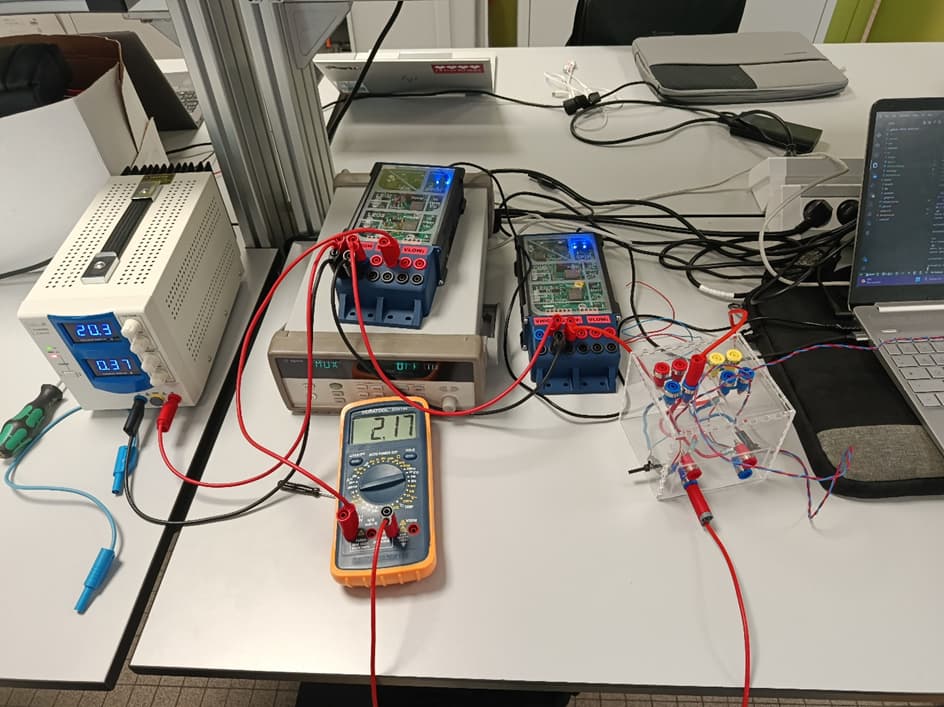
Here is the full wiring :

Using the Python script (expanding on the plotting code I shared previously), we configured the two boards to work in opposition: one board acts as a voltage source (Buck) and the second board acts as a current source (Boost) to circulate a fixed current.

Here is the section of the code that sends the references and triggers the automated DAQ measurement:

# Set Shield 1 as current source (5A) and Shield 2 as voltage source (10V)
message1 = Shield1.sendCommand("REFERENCE","LEG1","I1",5)
message1 = Shield2.sendCommand("REFERENCE","LEG1","V1",10.0)

print("Activation shield2 - voltage source")
message = Shield2.sendCommand("POWER_ON")
message = Shield2.sendCommand("LEG","LEG1","ON")
input()

print("Activation shield1 - current source")
message = Shield1.sendCommand("POWER_ON")
message = Shield1.sendCommand("LEG","LEG1","ON")

time.sleep(2)

# Automated measurement via the Agilent DAQ
print("Measured Voltage (Vres):", dmm.read_voltage_volts("Vres"))
for label, value in dmm.read_all_voltages_volts().items():
        print(label, value)
        time.sleep(1)

To ensure our automated system was reliable, we first validated the circuit manually. With 5A of current circulating, we used a standard multimeter to measure the voltage across our resistor and obtained approximately 50mV, which confirmed both our wiring and the expected 10mV/A ratio.

Finally, running our unified Python program, the Agilent DAQ successfully retrieved these exact same measurements automatically.

The testbench is now fully functional, capable of managing both Twist boards simultaneously and logging the data automatically! Thank you to everyone for following along with this project.

Here is the final script using this example “https://github.com/owntech-foundation/examples/tree/main/TWIST/Communication/python_comm_library“ :


import sys
import os
sys.path.append(os.path.abspath("."))

from owntech.lib.USB.comm_protocol.src import find_devices
from  owntech.lib.USB.comm_protocol.src.Shield_Class import Shield_Device
import time
import matplotlib.pyplot as plt
import matplotlib.animation as animation
import os
import pyvisa
from agilent import Agilent34970A
import time
import xmlrpc.client as xml
import time
import matplotlib.pyplot as plt
import numpy as np

os.add_dll_directory(r"C:\Program Files\Keysight\IO Libraries Suite\bin")

# Use Keysight VISA explicitly for 82357A.
rm = pyvisa.ResourceManager(r"C:\Windows\System32\agvisa32.dll")
print("Loaded VISA:", rm.visalib.library_path)
print("Resources:", rm.list_resources())

inst = rm.open_resource("GPIB0::10::INSTR")
inst.timeout = 5000
inst.write_termination = "\n"
inst.read_termination = "\n"
dmm = Agilent34970A(inst, channels={"Vres": "105"}, tc_type="V")

frame_limit = 100       # Nombre de points affichés sur l'axe X (largeur de la fenêtre)
reference = 5.0         # Consigne de départ (en Volts)
ref_step = 0.5          # Incrément de la consigne à chaque frame
ref_max_value = 10.0    # Valeur maximale de la consigne
ref_base_value = 5.0    # Valeur de retour quand le maximum est atteint

leg_to_test = "LEG1"                               #leg to be tested in this script
reference_names = ["V1","V2","VH","I1","I2","IH"]  #names of the sensors of the board

shield_vid = 0x2fe3
shield_pid = 0x0101
Shield_ports = (find_devices.find_shield_device_ports(shield_vid, shield_pid, 2))

# Sécurité : vérifier qu'on a bien au moins 2 cartes
if len(Shield_ports) < 2:
    print(f"Erreur : Seulement {len(Shield_ports)} carte(s) détectée(s). Branchez la deuxième !")
    sys.exit()

print(f"Cartes détectées sur les ports : {Shield_ports[0], Shield_ports[1]}")

# Création des deux objets distincts
Shield1 = Shield_Device(shield_port=Shield_ports[0])
Shield2 = Shield_Device(shield_port=Shield_ports[1])

# --- Configuration du graphique pour 2 cartes (4 courbes) ---
fig, ax = plt.subplots()
line1_b1, = ax.plot([], [], lw=2, label='Carte 1 - V1')
line2_b1, = ax.plot([], [], lw=2, label='Carte 1 - V2')
line1_b2, = ax.plot([], [], lw=2, linestyle='--', label='Carte 2 - V1')
line2_b2, = ax.plot([], [], lw=2, linestyle='--', label='Carte 2 - V2')

xdata = []
ydata1_b1, ydata2_b1 = [], []
ydata1_b2, ydata2_b2 = [], []

ax.set_xlim(0, frame_limit)
ax.set_ylim(0, 14)
ax.legend(loc='upper right')
ax.set_title('Real-time Plot - 2 Cartes OwnTech')

# Function to initialize the plot
def init():
    line1_b1.set_data([], [])
    line2_b1.set_data([], [])
    line1_b2.set_data([], [])
    line2_b2.set_data([], [])
    return line1_b1, line2_b1, line1_b2, line2_b2

def update(frame):
    global reference

    if frame == frame_limit:
        xdata.clear()
        ydata1_b1.clear()
        ydata2_b1.clear()
        ydata1_b2.clear()
        ydata2_b2.clear()
        ax.set_xlim(frame, frame + frame_limit)
    else:
        xdata.append(frame)

        reference = reference + ref_step
        if reference >= ref_max_value: 
            reference = ref_base_value

        # --- Envoi des consignes ---
        # Carte 1
        Shield1.sendCommand("REFERENCE", "LEG1", "V1", reference)
        Shield1.sendCommand("REFERENCE", "LEG2", "V2", reference)
        # Carte 2
        Shield2.sendCommand("REFERENCE", "LEG1", "V1", reference)
        Shield2.sendCommand("REFERENCE", "LEG2", "V2", reference)
        
        time.sleep(10e-3) # Pause de stabilité

        # --- Mesures ---
        # Carte 1
        ydata1_b1.append(Shield1.getMeasurement('V1'))
        ydata2_b1.append(Shield1.getMeasurement('V2'))
        # Carte 2
        ydata1_b2.append(Shield2.getMeasurement('V1'))
        ydata2_b2.append(Shield2.getMeasurement('V2'))

        # --- Mise à jour du plot ---
        line1_b1.set_data(xdata, ydata1_b1)
        line2_b1.set_data(xdata, ydata2_b1)
        line1_b2.set_data(xdata, ydata1_b2)
        line2_b2.set_data(xdata, ydata2_b2)

    return line1_b1, line2_b1, line1_b2, line2_b2


# ---------------HARDWARE IN THE LOOP PV EMULATOR CODE ------------------------------------
message1 = Shield1.sendCommand("IDLE")
message1 = Shield2.sendCommand("IDLE")
message1 = Shield1.sendCommand("REFERENCE","LEG1","I1",5)
# message1 = Shield1.sendCommand("REFERENCE","LEG2","V2",5)
message1 = Shield2.sendCommand("REFERENCE","LEG1","V1",10.0)
# message1 = Shield2.sendCommand("REFERENCE","LEG2","V2",5)
message = Shield1.sendCommand( "BUCK", "LEG1", "ON")
message = Shield2.sendCommand( "BUCK", "LEG1", "ON")
message = Shield1.sendCommand("POWER_OFF")
message = Shield2.sendCommand("POWER_OFF")
message = Shield1.sendCommand("LEG","LEG1","OFF")
message = Shield2.sendCommand("LEG","LEG1","OFF")
input()
print("Activation shield2 - source de tension")
message = Shield2.sendCommand("POWER_ON")
message = Shield2.sendCommand("LEG","LEG1","ON")
input()
print("Activation shield1 - source de courant")
message = Shield1.sendCommand("POWER_ON")
message = Shield1.sendCommand("LEG","LEG1","ON")

time.sleep(2)
print(dmm.read_voltage_volts("Vres"))
for label, value in dmm.read_all_voltages_volts().items():
        print(label, value)
        time.sleep(1)

dmm.close()
input()
print("Fin mesure")

message = Shield1.sendCommand("POWER_OFF")
message = Shield2.sendCommand("POWER_OFF")

This is what we successfully accomplished this week. While there is still room for improvement and we haven’t yet finalized a full script to test every possible value, we have built a strong foundation for future work. Thank you for reading.